
Lyric Video Maker
Turn a song into a lyric video. Paste the lyrics and let AI time every line, or tap along for free. Pick karaoke or line-by-line, 16:9 for YouTube or 9:16 for Reels and TikTok, and export an MP4 rendered in your browser. Try it with a sample song first.
“Tear It Down”, made with the AIFlowMusic AI Music Generator — lyrics already timed
The video is rendered in your browser. Your song is uploaded only if you choose AI sync, and deleted as soon as the lyrics are timed.
What a lyric video is
A lyric video shows the words of a song on screen as they are sung. Artists release one alongside a new track because it gives listeners something to watch on YouTube and something to sing along to, long before there is a music video — and people search for the lyrics anyway. A lyrics video maker handles the part that takes the time: putting every line on screen at the moment it is sung.
The hard part is the timing. Every line has to appear when it is sung, which by hand means scrubbing through the song and noting down hundreds of timestamps. This music lyric video maker does it for you in one of two ways. With AI sync — the automatic way — speech recognition (Whisper) listens to the song and the lyrics you pasted are matched to what it hears — so the words on screen are exactly yours, and only the timing comes from the AI. With tap-to-sync, you play the song and tap as each line starts.
Everything after that happens in your browser: the lines are drawn over your cover art or over a spectrum that moves with the music, either karaoke-style (each word fills as it is sung) or as the previous, current and next line, and the frames are encoded with your audio into an MP4. On our test songs, most AI-synced lines started within a few tenths of a second of the voice. In a dense rock mix or fast rap a few lines can be a second or more off; the editor highlights lines it is unsure about, and fixing one takes a click.
Lyric video maker features
Your lyrics, timed by AI
Paste the lyrics and AI matches them to the song word by word. What you pasted is exactly what appears on screen. Lines the AI couldn't hear are placed in between and highlighted for you to check.
No lyrics? Transcribe them
Leave the box empty and the AI writes down what it hears and splits it into lines. Stock phrases speech recognition invents over silence — a stray “Thank you.” at the end — are filtered out.
Free tap-to-sync
Play the song and tap, or press Space, as each line starts. No account and no credits; the video carries a small “Made with AIFlowMusic.com” mark in the corner.
Fix any line
Edit the words, nudge a line's start or end by a tenth of a second, split a line at the cursor, add or delete one, or tap again from any line to the end. Your lyrics are kept in this browser if you leave the page.
Karaoke or lines, any feed
Karaoke fills each word in your colour as it is sung; Lines shows the previous, current and next line. 16:9, 9:16 with the text kept above the caption area, or 1:1 — at 30 or 60 fps.
Cover, spectrum or transparent
Put the lyrics over your darkened cover art or over bars that move with the music, or export a transparent WebM to lay the lyrics over your own footage in a video editor.
What a lyric video from this tool looks like
Real frames from the sample song “Tear It Down”, made with our AI Music Generator and timed by AI sync from its pasted lyrics.
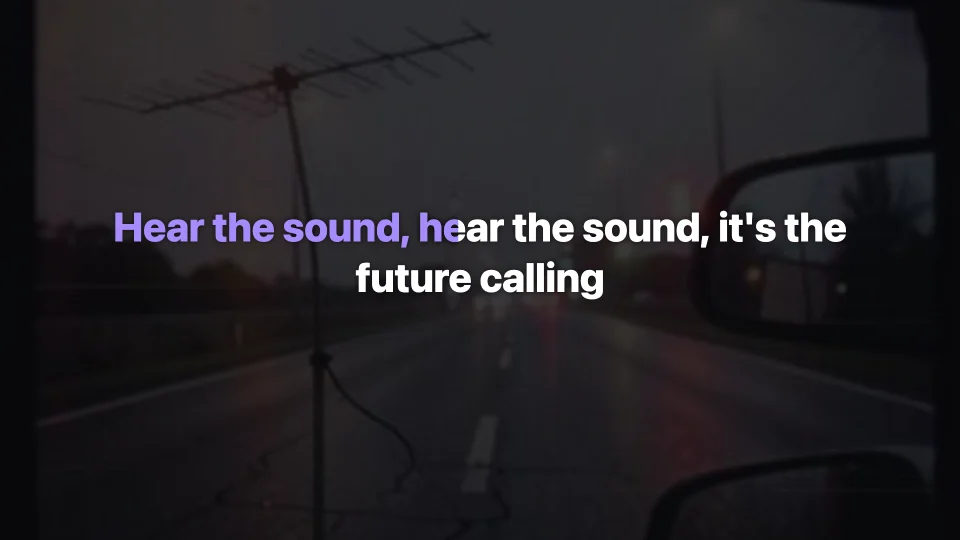
Karaoke, 16:9
Each word fills as it is sung, over the darkened cover art. Built for YouTube.
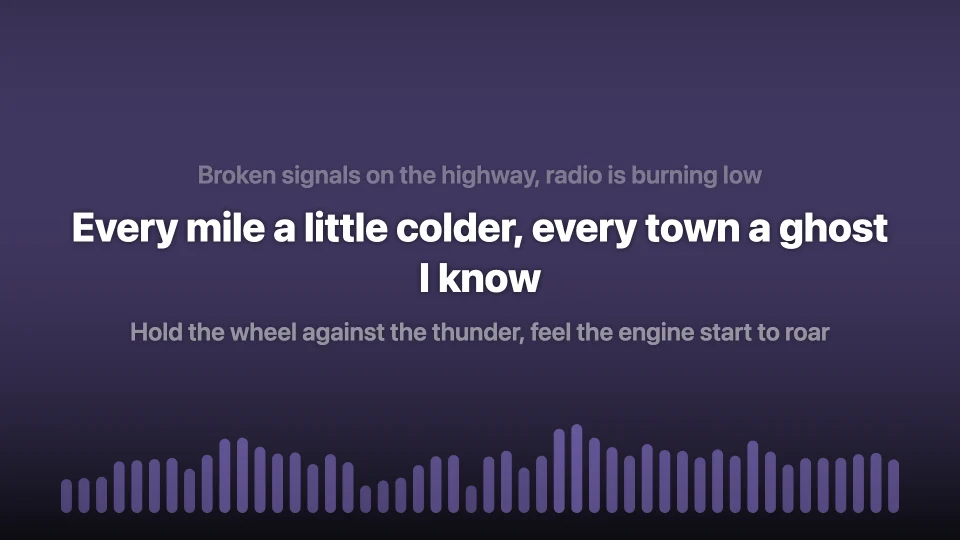
Lines over a moving spectrum
The previous line fades above, the current line is bright, the next waits below; the bars move with the music.
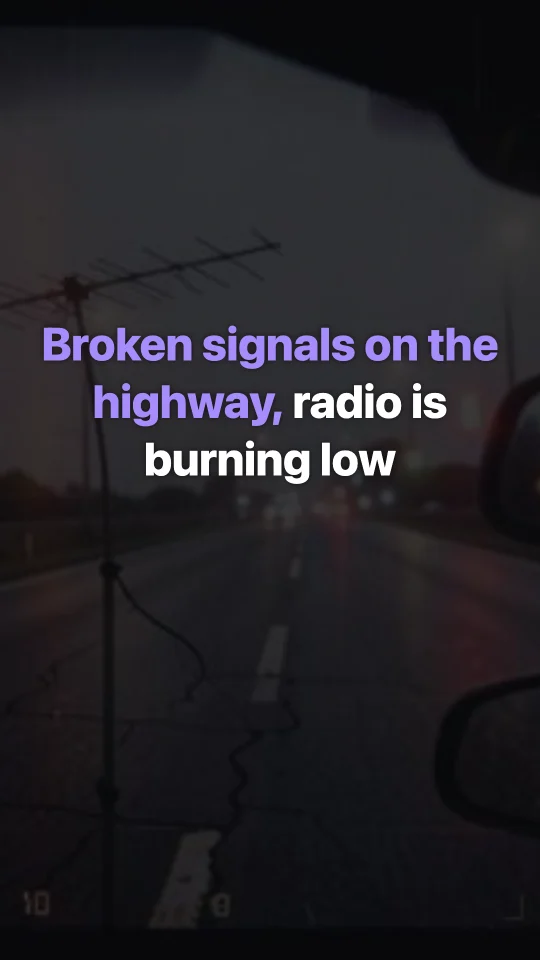
9:16 for Reels, TikTok and Shorts
Text kept in the upper part of the frame, clear of the captions and buttons apps put at the bottom.
Other ways to put a song on video:
Who makes a lyric video
Independent artists releasing a song
Put a lyric video on YouTube on release day, then export a 30-second vertical clip of the chorus for Reels and TikTok from the same timed lyrics.
AI music makers
Made a song with the AI Music Generator? Open it in your library and choose Lyric video. The timing comes from the song itself — no credit needed; like song downloads, it is available once you have made any purchase.
Singers, choirs and karaoke nights
Make a karaoke-style video where every word lights up on time, for rehearsals, sing-alongs or a cover you are posting.
Teachers and language learners
Show a song with its words appearing line by line — for a class, a lyric-reading exercise or learning a song in another language.
How to make a lyric video
1. Drop the song
MP3, WAV, FLAC, AIFF, OGG or M4A, up to 30 minutes. Or try the sample song, or send a song from your AIFlowMusic library.
2. Time the lyrics
Paste the lyrics and press Sync with AI (1 credit, songs up to 10 minutes), or tap along for free. Play through, fix any highlighted line, and change words if you need to.
3. Style it and export
Choose karaoke or lines, a background, a format — 16:9 for YouTube, 9:16 for TikTok, Reels and Shorts — and a length, add a title and cover, then press Export. The MP4 is rendered on your device and saved to your downloads.
Lyric video maker FAQ
Is this lyric video maker free?
Tap-to-sync and 720p / 30 fps MP4 exports are free, with a small “Made with AIFlowMusic.com” mark in the corner. AI sync costs 1 credit per song (new accounts get 10 welcome credits to try it). Any one-time credit pack ($6.90) or plan unlocks watermark-free 1080p, 60 fps and transparent WebM exports.
Is this an automatic lyric video maker?
Yes, with AI sync. Drop the song, paste the lyrics (or leave them out) and every line is timed for you, usually in 5 to 20 seconds; then you check the result and export. As an AI lyric video maker it costs 1 credit per song, refunded automatically if the sync fails. The free option is manual: you tap along as the song plays.
How does the AI sync work?
The song is sent to a speech recognition model (Whisper), which returns every word it hears with a start and end time. If you pasted the lyrics, they are matched against those words in order, so each of your words takes the time of the word it matches; words the model missed are placed between their neighbours. The song is deleted from our storage as soon as the timing comes back.
How accurate is the timing?
On our test songs — pop, rock, rap and a Spanish track — half of the AI-synced lines started within about 0.2 seconds of the voice, and most within half a second. Dense mixes and fast rap are harder: a few lines can be a second or more off, and a line nobody could hear is highlighted as a guess. Pasting the lyrics makes a big difference, because the AI then only has to find when your words are sung, not what they are.
Can I make a lyric video without the lyrics?
Yes. Leave the lyrics box empty and press Transcribe: the AI writes down what it hears, with its timing, split into lines. Expect to correct some words — sung lyrics are much harder to recognise than speech — or paste the official lyrics for a cleaner result.
Which languages work?
Speech recognition detects the song's language on its own; we tested English and Spanish songs. Languages written without spaces between words, such as Chinese or Japanese, don't line up word by word yet — use tap-to-sync for those.
Can I make a karaoke lyrics video?
Yes — the Karaoke style fills each word in your colour as it is sung. It uses the song as you upload it; for a sing-along without the lead vocal, remove the vocals first with the AI Vocal Remover and time the lyrics on the instrumental with tap-to-sync.
What format, resolution and frame rate is the export?
MP4 with H.264 video and AAC audio. Free accounts export at 720p / 30 fps with a small corner mark; any paid credit pack or plan unlocks 1080p (1920×1080, 1080×1920 or 1080×1080), 60 fps and transparent WebM with an alpha channel.
How long can the song and the video be?
You can load recordings up to 30 minutes. AI sync takes songs up to 10 minutes and 25 MB. One export can be up to 10 minutes at 30 fps or 5 minutes at 60 fps, and a clip length and start point let you export just the part you want.
Is my song uploaded anywhere?
Only if you use AI sync: the song is uploaded for the speech recognition and deleted as soon as the timing comes back. Tap-to-sync, the preview and the export all run in your browser, and the video itself is never uploaded.
Who owns the video?
You do. The video is made on your device from your audio, lyrics and images, and we don't keep a copy. Make sure you have the rights to the song, lyrics and artwork you use.
Which browsers work?
On Windows and macOS, recent Chrome and Edge export MP4. Browsers without an MP4 encoder export WebM instead, and a few (older Safari, for example) can preview but not export — the page tells you which before you press Export. Long exports are faster and more reliable on a computer than on a phone.
Put your lyrics on screen.
Paste the lyrics and let AI time them, or tap along for free. MP4, made in your browser.
More AI music tools
One place to generate, convert, detect, and remix.
Turn a prompt into a full song with vocals.
Write full song lyrics from a theme or a line.
Verses and hooks in trap, drill, boom bap and more.
Sung brand hooks and sonic logos with target lengths.
Shape phonk with BPM, key, energy, cowbell and 808 controls.
Two photos into the Hotel Lobby performance: original moves and audio.
Build lofi beats by scene, tempo, key, texture and length.
AI rap diss with lyrics + beat in seconds.
Stage name ideas by scene — trap, drill, classic.
Convert an MP3 into editable MIDI notes.
Remove vocals from a song and blend them back with a slider.
Render a .mid file to MP3 or WAV with real instrument sounds.
Split a track into vocals and instrumental.
Shift a song by semitones without changing its speed.
Turn a song into an MP4 video with a reactive spectrum.
Soundwave and spectrum videos for podcasts and voice.
Add a slowed + reverb tape vibe, free in your browser.
Find any track's tempo by tap or upload.
Find whether a song counts in 4 or in 3.
Detect the musical key of any song.
Check your pitch accuracy note by note.
Get key, Camelot code and tempo from one upload.
Batch-key up to 25 tracks into one table.
Find the key through your mic — no file needed.
Get every beat position, bar by bar.
Tap out a tempo, get delay times in ms.
Every note and chord in any key.
Find the note and frequency of any sample.
Live chromatic tuner in your browser.
Sing or play a note and see which note it is.
Turn a melody into note names and timings.
Measure your vocal range low to high.
WAV, FLAC, AIFF, OGG, M4A or MP3 into editable MIDI notes.
Piano audio to engraved sheet music, both hands.
Any recording into a readable, printable score.
AI vs by ear vs hiring — and the fast path.
6 formats in — score, PDF, MusicXML, MIDI out.
Tape warmth, wobble and vinyl crackle on any track.
Guitar, bass, ukulele and more — notes, Hz and a tuner.
BPM to ms for every note value.