
Music Visualizer
Drop a song, add your cover art and watch the spectrum move to it. Pick a style and a format, then export an MP4 ready for YouTube, Reels or TikTok — free, without a watermark, and without uploading your track anywhere. No song to hand? Try it with a sample.
“Neon Drive”, made with the AIFlowMusic AI Music Generator
The audio is decoded and the video is rendered in your browser. Your file never leaves your device.
What a music visualizer is
A music visualizer turns sound into moving graphics. The track is split into frequency bands many times a second, and each band drives something on screen: a bar that rises with the kick drum, a ring of spikes around the cover art that flares on the chorus, a line that traces the shape of the waveform. Because the picture is computed from the audio itself, it is always in sync — nobody has to edit anything to the beat.
For musicians, a visualizer is the quickest way to give a song a video. Streaming a track on YouTube or posting it to Instagram needs moving pictures, and a full music video takes a shoot, an editor and a budget. That is why so many releases go out as an "official visualizer": the cover art, the title and a spectrum that reacts to the music, running for the length of the song. It suits background listening and replays, and it can be ready the day the track is finished.
This online music visualizer measures your song in 48 frequency bands 30 times a second, blends between those measurements so the motion stays smooth at 30 or 60 frames per second, draws every frame in the style you pick, and encodes the frames with your original audio into an MP4 (H.264 video, AAC audio) right in your browser. There is no render queue and no upload, which is also why there is no watermark: no part of the export runs on our servers.
Music visualizer features
Five styles, switchable live
Circle spectrum around your cover, bars, mirrored bars, a waveform line, or a spinning vinyl record. Change style or colour while the preview plays and see it instantly.
Every feed's shape
1920×1080 for YouTube, 1080×1920 for Reels, TikTok and Shorts (with the title kept clear of the caption area), or 1080×1080 for a square post.
Clip the hook
Export the whole song, or a 60, 30, 15 or 8-second clip from any point — with short fades at both ends so the cut never clicks.
Your cover, title and name
Add cover art, a song title and an artist name and pick an accent colour. The cover also becomes a darkened backdrop behind the visualizer.
60 fps and transparent
Export at 30 or 60 fps. Or switch the background to transparent and get a WebM with alpha to lay over your own footage in an editor.
MP4, no watermark, no upload
H.264 + AAC, the format YouTube, Instagram and TikTok all take. Nothing is drawn on the video but what you chose, and the song never leaves your device.
What each music visualizer style looks like
These are real frames from this tool, made from "Neon Drive", a song from our AI Music Generator gallery. Every style works in 16:9, 9:16 and 1:1, in any of the five accent colours and with your own cover.
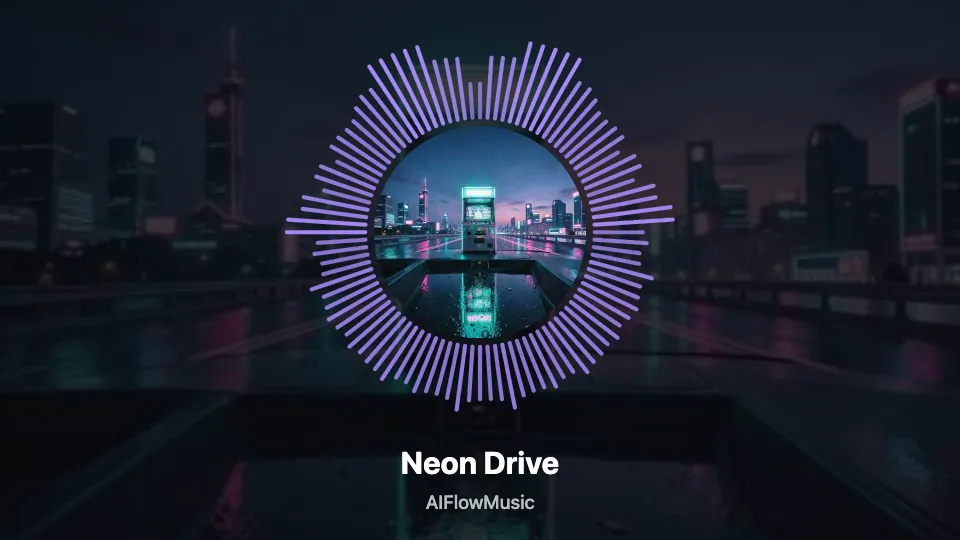
Circle spectrum
Bars ring your cover art and flare on the beat — the classic look for a single on YouTube.
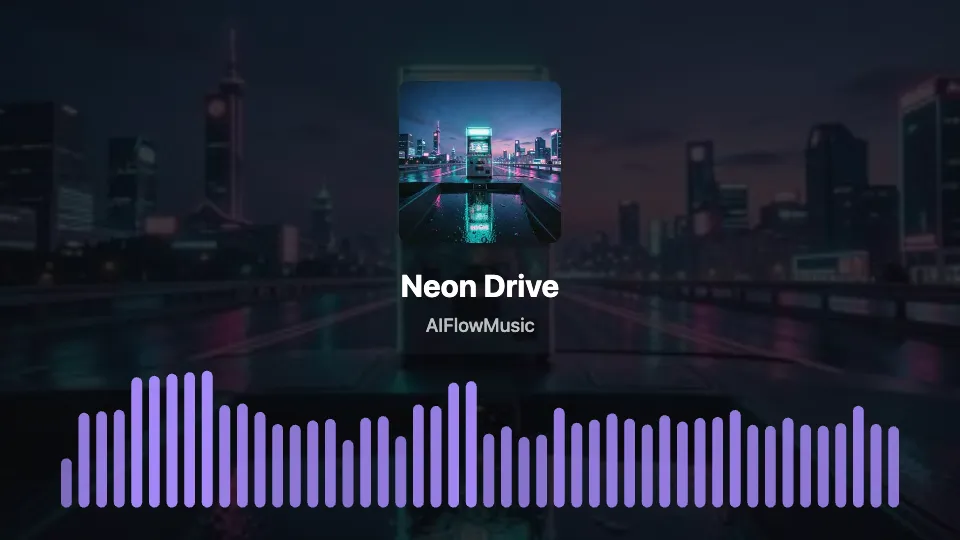
Bars
Cover, title and artist up top, a full-width spectrum along the bottom. Clear on any screen.
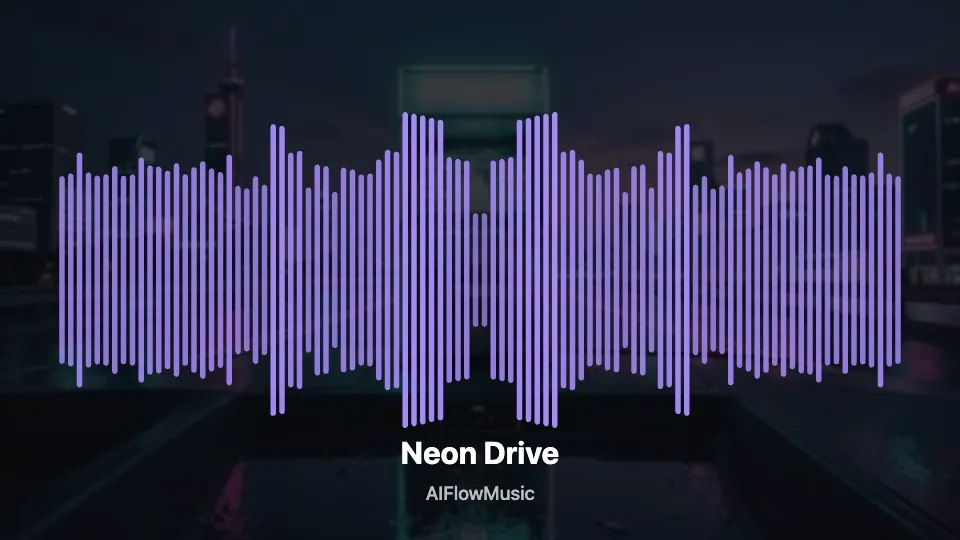
Mirror bars
Bass in the middle, treble at the edges, growing up and down from the centre line.
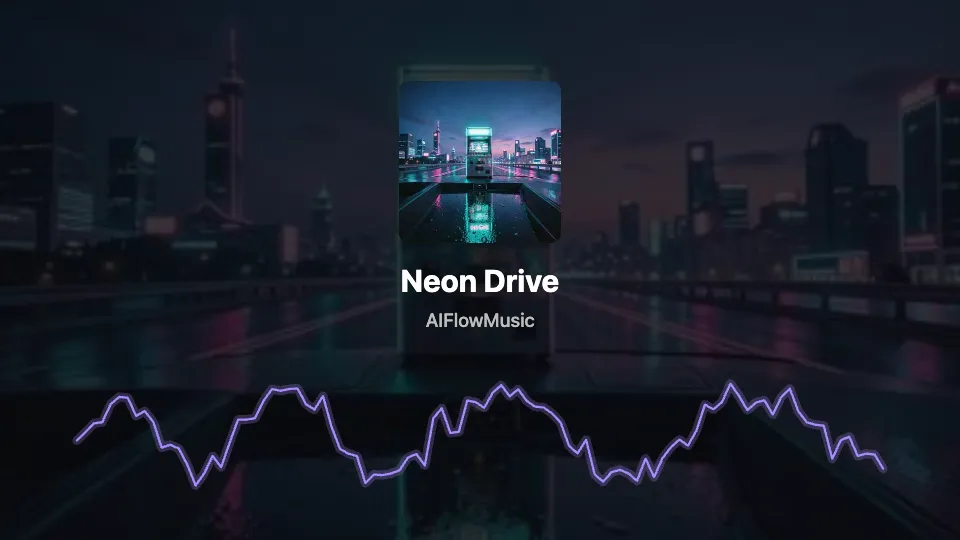
Waveform
A live line that follows the sound itself. Made for podcasts, voice notes and spoken word.
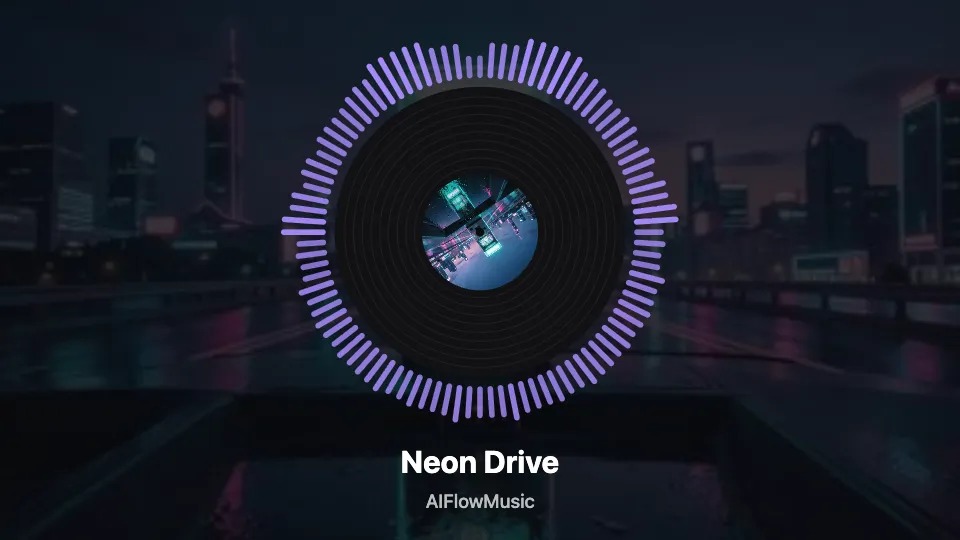
Spinning vinyl
Your cover becomes the label of a turning record, with a thin spectrum ring around it.
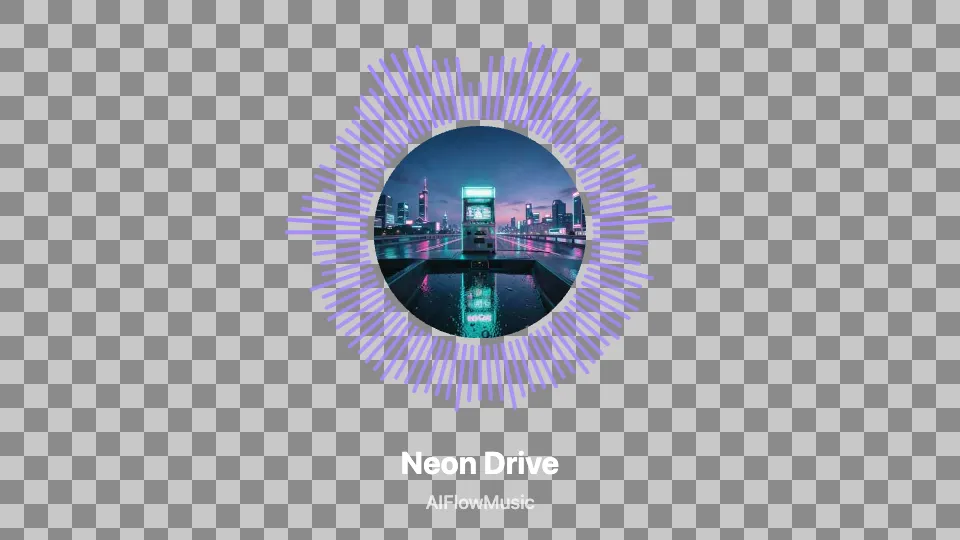
Transparent background
Export only the visualizer as a WebM with alpha and lay it over your own footage in an editor.
Making a clip from a podcast or a voice recording? The Audio Visualizer starts with the waveform style and podcast-friendly settings →
Who makes a music visualizer
Independent artists releasing a single
Put the track on YouTube as a visualizer on release day, then cut a 15 or 30-second vertical clip of the hook for Reels and TikTok.
Producers sharing beats
Upload beats to YouTube with the cover and the beat's name on screen, instead of a static image that viewers scroll past.
AI music makers
Made a song with the AI Music Generator? Open it in your library and send it to the visualizer instead of downloading and re-uploading it — the usual download rules for song files apply.
Video editors and streamers
Export a transparent visualizer and layer it over gameplay, a live set or B-roll, or put a 16:9 version behind a mix on your channel.
How to make a music visualizer
1. Drop the song
MP3, WAV, FLAC, AIFF, OGG or M4A, up to 30 minutes. It is decoded and analysed in your browser, so the preview is ready in seconds. Or press "try it with a sample song".
2. Style it
Choose a style, a format and a frame rate, add cover art, title and artist, pick a colour and, if you want, a clip length and start point. Press play to watch it with the music.
3. Export the MP4
Press Export. Every frame is rendered and encoded on your device and the MP4 is saved straight to your downloads, ready to upload.
Music visualizer FAQ
Is this music visualizer free?
Yes. There is no account, no credit system and no watermark on the export. The whole job runs on your own device, so there is no render cost for us to pass on.
Does the video have a watermark?
No. The exported video contains your cover, title, artist name and the visualizer — nothing else is drawn on it.
What is the difference between a visualizer and a music video?
A music video is filmed or animated around the song's story. A visualizer is generated from the audio: the cover art and graphics that react to the sound, usually running for the whole track. Many artists release a visualizer first because it is quick and cheap, and follow up with a music video for the songs that take off.
How do I make a visualizer for my music?
Drop the song on this page, add your cover art, title and artist, pick one of the five styles and a format (16:9 for YouTube, 9:16 for Reels and TikTok), press play to check it, then press Export. The MP4 lands in your downloads.
What format, resolution and frame rate is the export?
MP4 with H.264 video and AAC audio, in 1920×1080 (16:9), 1080×1920 (9:16) or 1080×1080 (1:1), at 30 or 60 frames per second. With a transparent background the export is a WebM with an alpha channel, because MP4 cannot carry transparency.
Can I export with a transparent background?
Yes. Set the background to Transparent and the export contains only the visualizer, cover and text, with everything else see-through. Use it as an overlay in an editor that reads WebM transparency.
Can I make a vertical video for Reels, TikTok or Shorts?
Yes. Choose 9:16 and a 15, 30 or 60-second clip, then move the start point to the part of the song you want — usually the hook. The title sits above the area where apps overlay captions and buttons.
Can I make a Spotify Canvas with it?
You can export an 8-second 9:16 clip, which matches Canvas's vertical shape and length range. Spotify reviews Canvas uploads against its own current requirements in Spotify for Artists, so check those before uploading.
How long can the song and the video be?
You can load recordings up to 30 minutes. One export can be up to 10 minutes at 30 fps or 5 minutes at 60 fps; longer tracks are cut there, and a clip length and start point let you pick a different section.
How long does the export take?
It depends on your device. In our tests on a 2021 MacBook Pro, a 20-second 1080p clip at 30 fps rendered in about 3 seconds — several times faster than it plays. Phones are slower, and 60 fps takes roughly twice as long as 30.
Who owns the video?
You do. The video is made on your device from your audio and images; we never receive a copy and add no branding. Make sure you have the rights to the music and artwork you use.
Is my song uploaded anywhere?
No. The audio is decoded, analysed and encoded in your browser. Your file never leaves your device.
Which browsers work?
On Windows and macOS, recent Chrome and Edge export MP4. Browsers without an MP4 encoder export WebM instead, and a few (older Safari, for example) can preview but not export — the page tells you which before you press Export. Long exports are faster and more reliable on a computer than on a phone.
Give your song a video.
Cover, spectrum, MP4. Free, no watermark, made in your browser.
More AI music tools
One place to generate, convert, detect, and remix.
Turn a prompt into a full song with vocals.
Write full song lyrics from a theme or a line.
Verses and hooks in trap, drill, boom bap and more.
Sung brand hooks and sonic logos with target lengths.
Shape phonk with BPM, key, energy, cowbell and 808 controls.
Build lofi beats by scene, tempo, key, texture and length.
AI rap diss with lyrics + beat in seconds.
Stage name ideas by scene — trap, drill, classic.
Convert an MP3 into editable MIDI notes.
Remove vocals from a song and blend them back with a slider.
Render a .mid file to MP3 or WAV with real instrument sounds.
Split a track into vocals and instrumental.
Shift a song by semitones without changing its speed.
Soundwave and spectrum videos for podcasts and voice.
Add a slowed + reverb tape vibe, free in your browser.
Find any track's tempo by tap or upload.
Find whether a song counts in 4 or in 3.
Detect the musical key of any song.
Check your pitch accuracy note by note.
Get key, Camelot code and tempo from one upload.
Batch-key up to 25 tracks into one table.
Find the key through your mic — no file needed.
Get every beat position, bar by bar.
Tap out a tempo, get delay times in ms.
Every note and chord in any key.
Find the note and frequency of any sample.
Live chromatic tuner in your browser.
Sing or play a note and see which note it is.
Turn a melody into note names and timings.
Measure your vocal range low to high.
WAV, FLAC, AIFF, OGG, M4A or MP3 into editable MIDI notes.
Piano audio to engraved sheet music, both hands.
Any recording into a readable, printable score.
AI vs by ear vs hiring — and the fast path.
6 formats in — score, PDF, MusicXML, MIDI out.
Tape warmth, wobble and vinyl crackle on any track.
Guitar, bass, ukulele and more — notes, Hz and a tuner.
BPM to ms for every note value.